Contents (14 sections)
Working from home can be incredibly productive, provided you have the right tools and gadgets. In this article, we’ll explore essential home office gadgets that not only enhance your workspace but also improve efficiency and comfort. Whether you're a seasoned remote worker or just starting out, these gadgets are designed to elevate your home office experience.
1. Ergonomic Office Chair
An ergonomic office chair is crucial for maintaining good posture while working long hours. These chairs are specifically designed to support your body and help prevent strain on your back and neck. Many models offer adjustable features, allowing you to find the perfect configuration for your height and weight. According to a report by the Health and Safety Executive, proper seating can reduce discomfort and increase productivity, making it a smart investment for any home office setup. Comfort is key; remember to look for a chair that promotes good posture and supports mobility.
2. Adjustable Standing Desk
Transitioning between sitting and standing can significantly boost your energy and focus. An adjustable standing desk allows you to switch positions throughout the day, helping to alleviate fatigue and improve circulation. Many models come with electronic height controls, making it easy to find your ideal working height. Research from Cornell University indicates that standing desks can lead to increased productivity and reduced feelings of fatigue. This makes them an excellent choice for anyone looking to invest in their health and well-being while working from home.
3. High-Quality Webcam
With video calls becoming a staple in remote work, having a high-quality webcam is essential. A good webcam can drastically improve the quality of your video during virtual meetings. Look for one with at least 1080p resolution and features like autofocus and low-light correction. Logitech, a reputable brand in video technology, offers several models that have received positive feedback from users for their reliability and clarity. An upgrade to a better webcam can enhance your professionalism during meetings, making the investment worthwhile.
4. Noise-Cancelling Headphones
Distractions can hinder productivity, especially in a home setting. Noise-cancelling headphones help you focus by blocking out unwanted sounds, allowing you to immerse yourself in your work. Features to consider include battery life, sound quality, and comfort during long use. Brands like Bose and Sony have received accolades for their noise-cancellation technologies. Users report that these headphones have transformed their working environment, enhancing focus and providing a more conducive atmosphere for creativity.
5. Smart Monitor
Investing in a smart monitor can greatly enhance multitasking capabilities. These monitors often include built-in apps that allow you to connect directly to services like Google Docs or Microsoft Office, reducing the need for switching devices constantly. Additionally, features like screen splitting and multiple input connections can facilitate a more productive workspace. According to a study by Vanderbilt University, having multiple screens can increase productivity by up to 30%. When selecting a monitor, consider size, resolution, and connectivity options to ensure it fits seamlessly into your setup.
6. Multi-Port USB Hub
The modern workspace often requires multiple devices to be connected simultaneously. A multi-port USB hub provides additional ports for your devices, making it easier to connect and manage multiple peripherals. Look for a hub with USB-C support if you have newer devices. A sturdy, reliable hub can save time and frustration when working with numerous devices and enhance workflow, allowing you to keep everything connected and within reach.
7. Document Scanner
Digital document management is becoming increasingly important in remote work. A compact document scanner can help you digitise paper documents quickly, making it easier to share and store important files. Look for a scanner with high resolution and fast scanning capabilities. Models from Fujitsu and Canon are often recommended for their efficiency and reliability. According to IDC, businesses that streamline their document management see a significant increase in efficiency and reduced overhead costs. Thus, investing in this gadget can enhance your home office productivity.
8. Smart Lighting
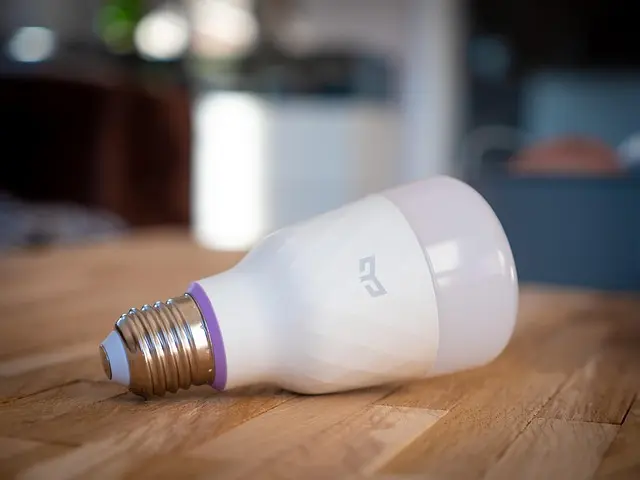
Proper lighting is essential for reducing eye strain and creating a pleasant working environment. Smart lighting solutions, which allow you to adjust brightness and colour temperature, can enhance your mood and focus. Many smart bulbs are compatible with home automation systems, allowing you to create schedules or control lighting remotely. A study by Harvard University found that proper lighting can enhance cognitive performance by up to 20%. Choosing the right lighting can thus lead to a healthier and more productive work behaviour.
📺 Resource Video
Discover Smart Office Gadgets - an in-depth guide evaluating the best home office gadgets available today. Search on YouTube: "best home office gadgets 2026".
Comparisons of Popular Home Office Gadgets
| Gadget Type | Product A | Product B | Product C | Verdict |
|---|---|---|---|---|
| Ergonomic Office Chair | Brand A Chair 1 | Brand B Chair 1 | Brand C Chair 1 | Brand A for comfort |
| Adjustable Standing Desk | Brand A Desk 1 | Brand B Desk 1 | Brand C Desk 1 | Brand A for stability |
| High-Quality Webcam | Brand A Webcam 1 | Brand B Webcam 1 | Brand C Webcam 1 | Brand B for clarity |
| Noise-Cancelling Headphones | Brand A Headphone | Brand B Headphone | Brand C Headphone | Brand B for comfort |
Frequently Asked Questions
What should I look for in a home office gadget?
When looking for home office gadgets, consider ergonomics, functionality, and fit for your specific work needs. Select products that enhance your comfort and productivity.
How can I improve my home office ergonomics?
Investing in ergonomic furniture like chairs and desks, optimising screen height, and using properly positioned keyboard and mouse setups can significantly improve your workspace ergonomics.
Are standing desks worth it?
Yes, standing desks can improve posture, reduce fatigue, and increase productivity, making them a worthy investment for remote workers.
How often should I take breaks while working from home?
Taking short breaks every hour can help refresh your mind and maintain focus. Try using a timer to remind you to stand up or stretch regularly.
Glossary
| Term | Definition |
|---|---|
| Ergonomics | The science of designing the workplace to fit the worker’s needs and improve comfort and efficiency. |
| Noise-Cancelling | Technology designed to reduce or eliminate unwanted ambient sounds using active or passive methods. |
| Smart Monitor | A monitor that includes built-in software for app access and often features like screen splitting. |
Checklist before Purchase
- [ ] Assess ergonomic needs
- [ ] Identify essential gadget types
- [ ] Budget for each item
- [ ] Research specific brands and models
- [ ] Check connectivity options
Investing in essential home office gadgets can transform your remote work experience, enhancing comfort and productivity. Don’t hesitate to make your workspace as functional and enjoyable as possible. For further exploration on which gadgets fit your routine, look no further than reputable tech review platforms.
📺 Pour aller plus loin : best home office gadgets 2026 sur YouTube